
The best F-Droid app to start with is one that solves a job you already have. Our source-based shortlist is AntennaPod for podcasts, KeePassDX for a local password database, and Fossify File Manager for organizing files. They serve different purposes; this is not a performance ranking or a claim that one app is safest.
We selected these three because their official F-Droid entries document a clear everyday use, link to source code, and provide release and permission information. We checked those entries on October 7, 2026. We have not installed or benchmarked the apps. If you are fitting an app into a larger routine, start with the Android productivity and essential apps guide.
Choose by the job you need done
| Your task | App and exact package ID | Documented capability | Check before relying on it |
|---|---|---|---|
| Listen to podcasts and move subscriptions | AntennaPod — de.danoeh.antennapod |
RSS feeds, OPML import/export, downloads and playback controls | Can you bring across the subscriptions you need? |
| Keep credentials in a local database | KeePassDX — com.kunzisoft.keepass.libre |
KeePass-format files, autofill and one-time passwords | Can you reopen a backed-up test database? |
| Organize files on the phone | Fossify File Manager — org.fossify.filemanager |
Search, sorting, compression and folder shortcuts | Can it access the folders you actually use? |
The links below go to the official catalog entries. Match the package ID as well as the display name, especially when searching for similarly named apps.
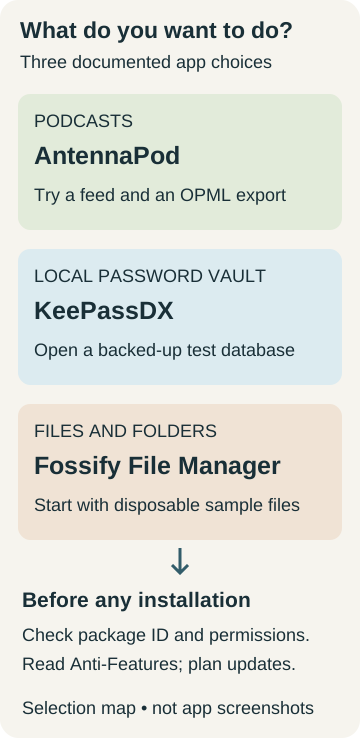
Original selection map, not application screenshots. Feature descriptions come from the linked catalog entries; suitability still depends on your workflow.
AntennaPod: start with one feed and an export
AntennaPod’s listing describes a podcast manager with RSS and OPML support, adjustable playback speed, a sleep timer, and configurable automatic downloads. Those controls make it a candidate if managing your own subscription list matters more than finding another all-purpose media service.
Our suggested first check is small: add a familiar feed, play an episode, and export the subscription list. Inspect the download settings before enabling automation. The listing allows downloads to depend on conditions such as Wi-Fi or charging; choose conditions that suit your data and storage limits.
Its listed permissions include network access and media playback services. Those are relevant to its job, not proof that any network activity is harmless. The entry describes the app as ad-free; that is not a promise about advertising within a publisher’s podcast audio.
KeePassDX: decide how you will keep a recoverable vault
KeePassDX’s listing describes a local, encrypted KeePass-format database, autofill, and HOTP/TOTP support. It says the app does not require an internet connection. Consider it if you want a file-based vault and are prepared to manage that file deliberately.
Before moving real credentials, create a small test database with invented entries. Close and reopen it, make a backup, and check that you can open the backup using the intended credentials. Then try autofill in the particular app or browser you use. These are proposed acceptance checks, not tests we have performed.
A local vault is not, by itself, a recovery plan. Write down where your working database and backup will live, and how you will access them if the phone is unavailable. Do not replace your current password workflow until you understand that process. We make no independent security-audit claim for KeePassDX.
Fossify File Manager: check access before moving important files
Fossify File Manager’s listing documents file search and sorting, compression, favorite folders, and storage analysis. It is a candidate for everyday folder organization. We have not measured its speed or verified the catalog’s broader promotional security claims.
Its current listing includes shared-storage read/write access and a request-install-packages permission. Read the permission information before installing; a file manager’s ability to manipulate files deserves attention even when its source code is available.
Try a disposable folder first. Copy a sample document, rename the copy, find it again, and confirm that it opens. Check the specific SD card or USB location you use rather than assuming every storage location will be accessible. Avoid making your first experiment a bulk move or deletion of irreplaceable files.
Check maintenance and Anti-Features at download time
This is the catalog snapshot we reviewed, not a future update guarantee:
| App | Most recent release entry shown as added | Anti-Features shown on the reviewed listing |
|---|---|---|
| AntennaPod | September 20, 2026 | None shown |
| KeePassDX | September 27, 2026 | None shown |
| Fossify File Manager | February 18, 2026 | None shown |
An older entry date alone does not establish that a project is abandoned. Follow the listing’s changelog and issue-tracker links when you need to assess an unresolved problem or a missing feature. Check the current Android requirement for the offered build rather than relying on the age of this article.
F-Droid’s Anti-Features identify matters such as advertising, tracking, proprietary dependencies, and known vulnerabilities. F-Droid also cautions that some issues may go unnoticed. “None shown” is therefore an observation about these listings, not a privacy certification. Open source does not mean that every app, network service, or downloaded item is risk-free.
Install from the official source, then close unused permissions
- Open F-Droid’s official website and obtain its client there. The package pages recommend the client over individual APK downloads because direct downloads do not provide update notifications.
- Follow the phone’s installation prompt. On Pixel, Google documents Allow from this source for the particular app initiating installation. Authorize only the source app you intended to use; this is not permission for every app to install packages.
- Open F-Droid, let its catalog load, and use the exact package IDs above to confirm your selection. Read the current permissions and any Anti-Features before installing. Adding an unrelated third-party repository is unnecessary for these picks.
- Revoke installation permission when you no longer need it. Google’s Pixel path is Settings → Apps → Special app access → Install unknown apps → select the source app → turn off Allow from this source. Other devices may use different labels. F-Droid may need authorization again when you later install an update.
On phones with Google Play Protect, Google recommends keeping it enabled. If installation is blocked, read the actual reason instead of treating every warning as the same setting. Google also documents a separate developer-verification installation flow; an ordinary source-permission toggle is not a promise that every device will accept an APK. This guide does not ask you to bypass a security or device-management restriction.
Keep an update channel and a migration plan
A familiar app name does not establish that an APK can update an existing installation. F-Droid’s signing FAQ explains that different signing identities can require uninstalling before changing distribution channels, and that uninstalling removes private app data. It also supports verified reproducible builds carrying an upstream developer’s signature, so it would be wrong to say every F-Droid build has a different signature.
Keep a note of the repository used for each app. If a proposed update reports a signature conflict, stop and consult the app’s migration guidance. Export or back up data and establish how to restore it before removing the existing installation. Do not uninstall a working vault merely to try another APK source.
For a first F-Droid app, choose the least disruptive task from the table, run the suggested small check, and keep your old workflow until the replacement does what you need.
How this shortlist was prepared
TasteOfAndroid prepared this guide with AI assistance using the linked F-Droid and Google documentation. The selections reflect documented functions, identifiable packages, and inspectable catalog information. The practical checks are editorial suggestions. We did not perform device testing, audit source code, inspect network traffic, or verify claims of superior speed or security.
Sources & methodology9 sources
Evidence used for this article. Links open the original source in a new tab.
- AntennaPod package listing — F-Droid
- KeePassDX package listing — F-Droid
- Fossify File Manager package listing — F-Droid
- Anti-Features — F-Droid
- FAQ for app developers: signing and updates — F-Droid
- Download apps to your Pixel phone — Google
- F-Droid official client website — F-Droid
- Use Google Play Protect — Google
- Allow app installs from unverified developers — Google
Related Articles
Ultimate Android Productivity and Essential Apps Guide
Transform your Android phone or tablet into a focused workstation. Discover the best productivity apps, local markdown workflows, and deep Tasker automations.
How to Back Up an Android Phone in 2026: Photos, Messages and Authenticator Codes
Back up Android photos, messages and authenticator access as separate systems, then verify each one before a reset, repair, sale or trade-in.
Before You Sell Your Android Phone: The 2026 Privacy Checklist
Before selling an Android phone, verify data and sign-in access, move device-bound services, remove accounts and removable items, then reset safely.